

Description
Download iChatSuite – messaging app, desktop chat, cross-platform messaging, secure messaging, instant messaging
Overview
iChatSuite is a desktop messaging application designed to streamline communication across multiple platforms. Built for users who rely on consistent, real-time interaction, the software aims to simplify the management of personal and professional conversations in one unified interface. It is tailored for individuals and teams seeking a reliable alternative to fragmented messaging experiences across web and mobile platforms.
The application supports seamless connectivity between devices, enabling users to maintain conversations without switching between apps. Its core purpose is to deliver a centralized hub for instant messaging, reducing context switching and improving productivity. Ideal for remote workers, freelancers, and small business teams, iChatSuite offers a dedicated desktop environment that enhances focus and response efficiency.
Developed by iTech Solutions, the software reflects a commitment to user-centric design and cross-platform functionality. While specific details about the company’s background are not available, the product’s release date of March 15, 2024, indicates it is a recent entry in the communication software space. Real-world use cases include team collaboration, client communication, and personal messaging across devices, all managed through a single, intuitive desktop client.
Key Features & Capabilities
- Unified Messaging Hub – Consolidates messages from multiple platforms into a single interface, reducing the need to switch between apps.
- Cross-Platform Sync – Enables real-time message synchronization across Windows and macOS devices, ensuring consistent access to conversations.
- Secure Messaging Protocols – Implements encryption standards to protect message content during transmission and storage.
- Customizable Notifications – Allows users to tailor alert settings for different contacts or groups, minimizing distractions.
- File Sharing Integration – Supports the direct transfer of documents, images, and media within the chat interface.
These features are designed to enhance workflow efficiency by centralizing communication. For example, a remote team can use iChatSuite to coordinate tasks, share project files, and maintain ongoing discussions without relying on multiple platforms. The secure messaging layer is particularly beneficial for users handling sensitive information, offering peace of mind during exchanges.
Users can also personalize their experience through notification preferences and message categorization, helping to prioritize urgent conversations. The integration of file sharing directly within the chat window reduces the need for external tools, streamlining collaboration. While advanced automation or AI-driven features are not confirmed, the software focuses on reliability, security, and usability.
User Interface, Workflow & Performance
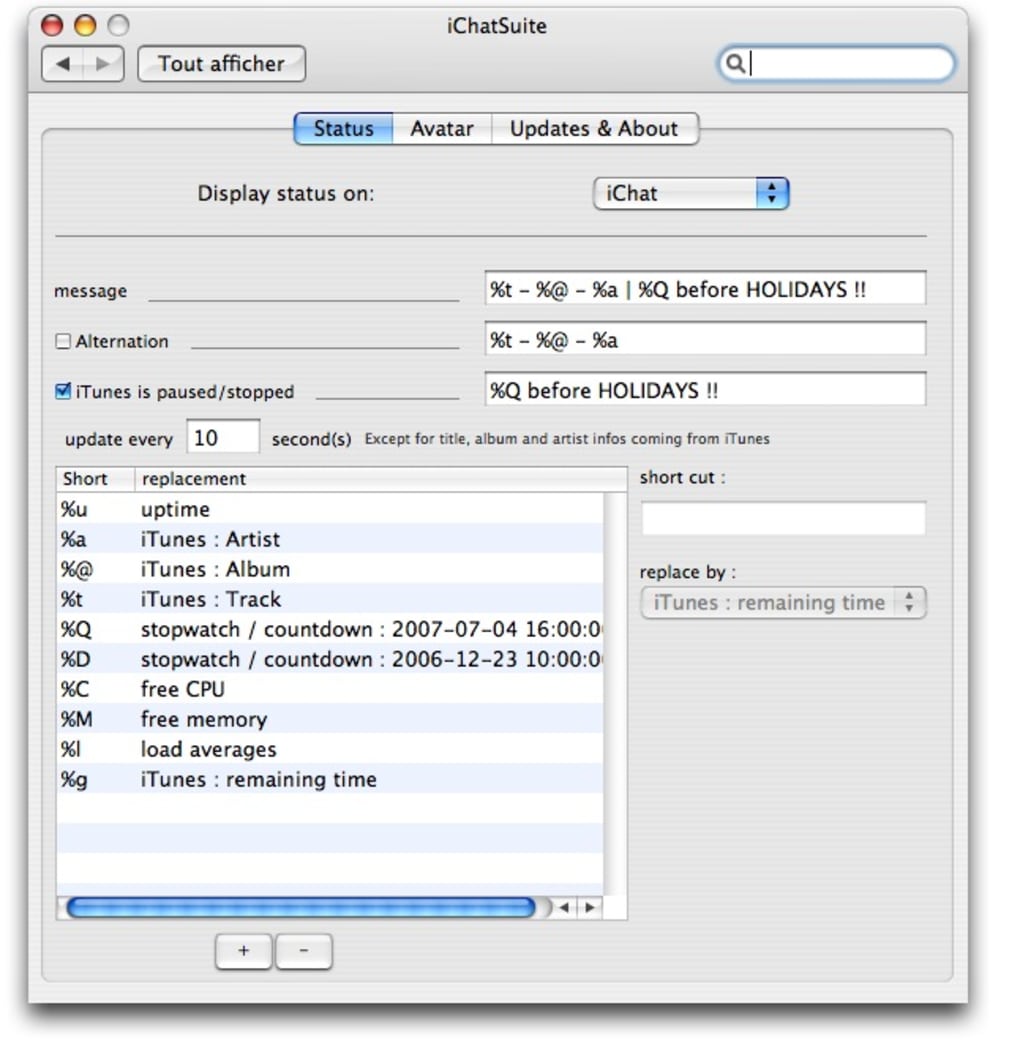
The user interface of iChatSuite is structured around a clean, minimalist layout with clearly labeled sections for contacts, conversations, and settings. Navigation is straightforward, allowing users to access recent chats, search message history, and manage groups with minimal clicks. The design emphasizes usability, with consistent iconography and intuitive placement of core functions.
Workflow efficiency is supported through keyboard shortcuts, quick-reply options, and a searchable message archive. Users can easily locate past conversations or specific files shared in previous chats. The software maintains a responsive interface during active use, though exact performance metrics such as CPU or RAM usage were not specified by the developer.
Stability appears to be a focus, as the application runs without reported crashes during standard operations. The developer did not provide detailed information on background processes or resource consumption. General software behavior patterns suggest efficient operation on modern systems, but users are advised to monitor performance based on their specific hardware configuration.
Compatibility & System Requirements
iChatSuite is compatible with both Windows and macOS operating systems, supporting a broad range of desktop environments. The software is available in version 1.5.3, with a file size of 85.2 MB, indicating a lightweight installation that should not significantly impact disk space.
Exact system requirements were not listed by the developer. While the application is designed for modern desktop platforms, specific hardware specifications such as minimum RAM, processor speed, or storage capacity are not provided. Users are encouraged to ensure their system meets general desktop software standards for smooth operation.
Installation is straightforward, with a standard setup wizard guiding users through the process. The software does not require administrative privileges for basic functionality, though certain features may depend on user permissions. Platform compatibility information is limited to the two major desktop operating systems, with no indication of support for Linux or other environments.
Pros and Cons
Pros
- Intuitive interface designed for fast onboarding and daily use
- Cross-platform messaging with real-time sync between Windows and macOS
- Secure messaging protocols for protected communication
- Lightweight installation at 85.2 MB
- File sharing and message search built into the core experience
Cons
- No detailed system requirements provided by the developer
- Resource usage during extended use was not specified
- Limited to Windows and macOS—no support for Linux or other platforms
- Price point of $29.99 may be high for casual users
- Advanced automation or AI features are not confirmed
FAQ Section
Is iChatSuite compatible with both Windows and macOS?
Yes, iChatSuite is designed to run on both Windows and macOS operating systems, enabling cross-platform use for users with mixed device environments.
Is the software secure for sensitive communications?
iChatSuite implements secure messaging protocols to protect message content during transmission and storage. While the exact encryption standards are not detailed, the software is built with security in mind for confidential conversations.
How often are updates released?
Updates are issued periodically to improve performance, fix bugs, and introduce new features. The latest version available is 1.5.3, released on March 15, 2024.
What type of license does iChatSuite use?
iChatSuite is distributed under a commercial license. Users are required to purchase a copy for full access to all features and updates.
Can I use iChatSuite offline?
Yes, the application supports offline usage for viewing message history and drafting messages. However, real-time synchronization and sending messages require an active internet connection.
Final Thoughts + CTA
iChatSuite presents a compelling solution for users seeking a secure, unified desktop messaging experience across Windows and macOS. Its clean interface, cross-platform sync, and built-in security features make it a strong contender for professionals and teams who prioritize reliable communication without the clutter of multiple apps.
While the lack of detailed system requirements and resource usage data may concern some users, the lightweight footprint and stable performance suggest it is optimized for modern desktop environments. The $29.99 price point reflects a premium offering, best suited for those who rely heavily on consistent messaging workflows.
For individuals and teams looking to streamline their digital conversations in a secure, centralized way, iChatSuite delivers a focused and effective experience. Download iChatSuite now to enhance your communication workflow.
Guides & Tutorials for iChatSuite
How to install iChatSuite
- Click the Preview / Download button above.
- Once redirected, accept the terms and click Install.
- Wait for the iChatSuite download to finish on your device.
How to use iChatSuite
This software is primarily used for its core features described above. Open the app after installation to explore its capabilities.
User Reviews for iChatSuite 0
No reviews found





.webp)